 PassportPhotoFlow
Take your US passport photo at home
All you need is a plain white or off-white wall, a window and your phone.

Your phone photo

2×2 in
Not affiliated with any government agency.
What we do for you
- We crop, size and, if needed, turn it upright
- We check head size and eye height
- We check background, glasses, expression and lighting
- We never change your face or your wall
How to do it
- 1
Plain white or off-white wall, 3 ft away
- 2
Someone shoots from 4 ft, or a shelf
- 3
See the check, retake, download

U.S. passport and visa photo specs
| Print size | 2×2 in (51×51 mm) |
|---|---|
| Head | 1 to 1⅜ in (25 to 35 mm) |
| Background | Plain white or off-white |
| Passport digital file | Between 54 KB and 10 MB |
| Visa digital file | 600×600 pixels, up to 240 kB |
Source: U.S. Department of State, read November 6, 2026. Not affiliated with any government agency.
Get it right the first time
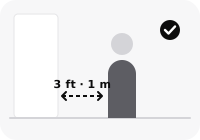
Stand about 3 ft (1 m) in front of a plain white or off-white wall
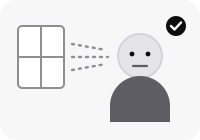
Face a window or lamp: even light, no shadows
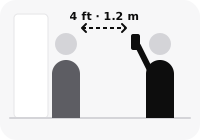
Someone holds the phone about 4 ft (1.2 m) away at eye level
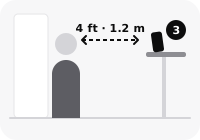
Alone? Put the phone on a shelf at eye level and step back
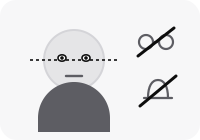
Head straight, eyes open, mouth closed, no glasses or hat
Also
- Nothing on the wall: no pictures, doors or furniture
- Wear a shirt or top you'd normally wear day to day — no bare shoulders, uniforms or camouflage.
Questions
What background do I need at home?
A plain white or off-white wall with nothing on it. We don't edit the background, so the wall has to be right in the photo.
Can I take the photo by myself?
Yes, but not at arm's length. Lean your phone on a shelf at eye level and step back, or ask someone to take it.
How do I print it at home?
The Complete option includes a printable 4×6 sheet (digital file) with two 2×2 photos. Print it at 100% / actual size, then cut along the guides.